CakeDC Blog

TIPS, INSIGHTS AND THE LATEST FROM THE EXPERTS BEHIND CAKEPHP

CakeDC Users Plugin for CakePHP 3

IMPORTANT: This tutorial is old, please check the updated CakeDC Users Plugin for CakePHP 3


If you are using an old version, we recommend to migrate to latest version of the plugin. We'll keep this article online for some more time....


Welcome to our first tutorial covering the new CakeDC Users Plugin for CakePHP 3. In this tutorial we'll setup and configure the Plugin, introducing some of the available features.

We'll assume you are starting a new CakePHP 3.1 application, with some existing tables (blog site maybe?).

Setup

Easy thing, let's use composer to install the CakeDC Users Plugin

        composer require cakedc/users:~3.1.0

Note we use 3.1.x branch and tags for the CakePHP 3.1 branch, and 3.0.x and tags for the 3.0 version of the framework.

Now ensure the Plugin is loaded from your bootstrap.php file

        Plugin::load('CakeDC/Users', ['routes' => true, 'bootstrap' => true]);

Create some tables to store the users in your database

        bin/cake migrations migrate -p CakeDC/Users

This migration will create 2 tables into your database, "users" where the users and credentials are stored, and "social_accounts" where the tokens for the social login feature will be stored and managed.

Now you can register a new user (ensure your CakePHP is able to send emails to get your validation link correctly), or you could use the provided shell to create new users from the command line

        bin/cake users addSuperuser
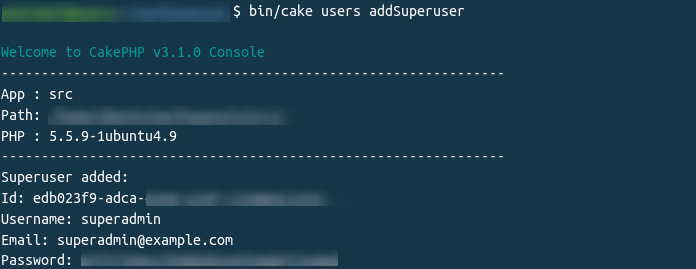
output for the shell command to generate new superuser

This new super user will be granted full administrative permissions (check the src/Auth/SuperuserAuthorize class for more details and configuration)

Configuration

Load the Component in your src/Controller/AppController.php

    public function initialize()
    {
        parent::initialize();
        //
        // ...
        //
        $this->loadComponent('CakeDC/Users.UsersAuth');
    }

login page output

Now you have the Plugin installed and a brand new superuser granted with full permissions, it's time to configure permissions for the rest of the roles you'll need.

Simple role based permission rules

By default, the CakeDC Users Plugin allow users to register, and all new users are assigned role = 'user' by default. Note you can change the default role name assigned to new users, but we'll keep the 'user' role for now. Let's assume you have some controller with a couple actions you want to allow, for example "/posts/view/*" We are going to configure SimpleRBAC to allow the role = 'user' accessing the 'view' action:

Create a new file "config/permissions.php" with the following contents

    return [
        'Users.SimpleRbac.permissions' => [
            [
                'role' => 'user',
                'controller' => 'Posts',
                'action' => ['view'],
            ],
        ]
    ];
    

Now you've defined your first permission rule, allowing users with role = 'user' to access the /posts/view action, note you can use wildcards '*', and arrays to cofigure your rules.

Cool, so now you have users in your application, allowing new users to register, validate their emails, login, change password, and use cookies to remember login. In our next short tutorial we'll cover Facebook login and Twitter login.

Ownership

What about ownership? We are talking about posts, and possibly you'll need to allow the post author to edit his own post, the good news: this is super easy with CakeDC Users Plugin.

Add a new rule to allow only the owner of a given post to edit it. Update your permissions.php file, adding this rule:

    use Cake\ORM\TableRegistry;
    use Cake\Utility\Hash;

    return [
        'Users.SimpleRbac.permissions' => [
            [
                'role' => 'user',
                'controller' => 'Posts',
                'action' => ['view'],
            ],
            [
                'role' => 'user',
                'controller' => 'Posts',
                'action' => ['edit', 'delete'],
                'allowed' => function (array $user, $role, Request $request) {
                    $postId = Hash::get($request->params, 'pass.0');
                    $post = TableRegistry::get('Posts')->get($postId);
                    $userId = Hash::get($user, 'id');
                    if (!empty($post->user_id) && !empty($userId)) {
                        return $post->user_id === $userId;
                    }
                    return false;
                }
            ],
        ]
    ];
    

And we're done, you've configured ownership permissions for your ['edit', 'delete'] actions.

Check other examples in the CakeDC Users Plugin Docs

Read more about CakeDC Users Plugin

Giving back to the community

This Plugin's development has been sponsored by the Cake Development Corporation. Contact us if you are interested in:

We'll continue working on our open source plugins (like this one) to give back to the amazing CakePHP Community!


Latest articles

Goodbye to 2025!

Well bakers… another advent calendar is coming to an end. I hope you enjoyed all of the topics covered each day. We are also closing the year with so much gratitude.    2025 was the 20th year of CakePHP, can you believe it? We had an amazing year with our team, the community and the CakePHP core. It was great connecting with those who attended CakeFest in Madrid, and we hope to have the opportunity to see more of you in 2026.    I cannot let the year end without getting a little sentimental. There is no better way to say it… THANK YOU. Thank you to the team who worked so hard, the core team that keeps pumping out releases, and most of all … thank you to our clients that trust us with their projects. CakeDC is successful because of the strong relationships we build with our network, and we hope to continue working with all of you for many years.    There are a lot of great things still to come in year 21! Could 2026 will be bringing us CakePHP 6?! Considering 21 is the legal drinking age in the US, maybe CakePHP 6 should be beer cake? Delicious. Stay tuned to find out.    Before I go, I am leaving you with something special. A note from Larry!   As we close out this year, I just want to say thank you from the bottom of my heart. Twenty years ago, CakePHP started as a simple idea shared by a few of us who wanted to make building on the web easier and more enjoyable. Seeing how far it has come, and more importantly, seeing how many lives and careers it has impacted, is something I never take for granted. I am deeply grateful for our team, the core contributors, the community, and our clients who continue to believe in what we do. You are the reason CakePHP and CakeDC are still here, still growing, and still relevant after two decades. Here is to what we have built together, and to what is still ahead. Thank you for being part of this journey. Larry

Pagination of multiple queries in CakePHP

Pagination of multiple queries in CakePHP

A less typical use case for pagination in an appication is the need to paginate multiples queries. In CakePHP you can achieve this with pagination scopes.

Users list

Lest use as an example a simple users list. // src/Controller/UsersController.php class UsersController extends AppController { protected array $paginate = [ 'limit' => 25, ]; public function index() { // Default model pagination $this->set('users', $this->paginate($this->Users)); } } // templates/Users/index.php <h2><?= __('Users list') ?>/h2> <table> <thead> <tr> <th><?= $this->Paginator->sort('name', __('Name')) ?></th> <th><?= $this->Paginator->sort('email', __('Email')) ?></th> <th><?= $this->Paginator->sort('active', __('Active')) ?></th> </tr> </thead> <tbody> <?php foreach ($users as $user): ?> <tr> <td><?= h($user->name) ?></td> <td><?= h($user->email) ?></td> <td><?= $user->active ? 'Yes' : 'No' ?></td> </tr> <?php endforeach; ?> </tbody> </table> <?= $this->Paginator->counter() ?> <?= $this->Paginator->prev('« Previous') ?> <?= $this->Paginator->numbers() ?> <?= $this->Paginator->next('Next »') ?>

Pagination of multiple queries

Now, we want to display two paginated tables, one with the active users and the other with the inactive ones. // src/Controller/UsersController.php class UsersController extends AppController { protected array $paginate = [ 'Users' => [ 'scope' => 'active_users', 'limit' => 25, ], 'InactiveUsers' => [ 'scope' => 'inactive_users', 'limit' => 10, ], ]; public function index() { $activeUsers = $this->paginate( $this->Users->find()->where(['active' => true]), [scope: 'active_users'] ); // Load an additional table object with the custom alias set in the paginate property $inactiveUsersTable = $this->fetchTable('InactiveUsers', [ 'className' => \App\Model\Table\UsersTable::class, 'table' => 'users', 'entityClass' => 'App\Model\Entity\User', ]); $inactiveUsers = $this->paginate( $inactiveUsersTable->find()->where(['active' => false]), [scope: 'inactive_users'] ); $this->set(compact('users', 'inactiveUsers')); } } // templates/Users/index.php <?php // call `setPaginated` first with the results to be displayed next, so the paginator use the correct scope for the links $this->Paginator->setPaginated($users); ?> <h2><?= __('Active Users') ?>/h2> <table> <thead> <tr> <th><?= $this->Paginator->sort('name', __('Name')) ?></th> <th><?= $this->Paginator->sort('email', __('Email')) ?></th> <th><?= $this->Paginator->sort('active', __('Active')) ?></th> </tr> </thead> <tbody> <?php foreach ($users as $user): ?> <tr> <td><?= h($user->name) ?></td> <td><?= h($user->email) ?></td> <td><?= $user->active ? 'Yes' : 'No' ?></td> </tr> <?php endforeach; ?> </tbody> </table> <?= $this->Paginator->counter() ?> <?= $this->Paginator->prev('« Previous') ?> <?= $this->Paginator->numbers() ?> <?= $this->Paginator->next('Next »') ?> <?php // call `setPaginated` first with the results to be displayed next, so the paginator use the correct scope for the links $this->Paginator->setPaginated($inactiveUsers); ?> <h2><?= __('Inactive Users') ?>/h2> <table> <thead> <tr> <th><?= $this->Paginator->sort('name', __('Name')) ?></th> <th><?= $this->Paginator->sort('email', __('Email')) ?></th> <th><?= $this->Paginator->sort('active', __('Active')) ?></th> </tr> </thead> <tbody> <?php foreach ($inactiveUsers as $inactiveUser): ?> <tr> <td><?= h($inactiveUser->name) ?></td> <td><?= h($inactiveUser->email) ?></td> <td><?= $inactiveUser->active ? 'Yes' : 'No' ?></td> </tr> <?php endforeach; ?> </tbody> </table> <?= $this->Paginator->counter() ?> <?= $this->Paginator->prev('« Previous') ?> <?= $this->Paginator->numbers() ?> <?= $this->Paginator->next('Next »') ?> And with this you have two paginated tables in the same request.

Clean DI in CakePHP 5.3: Say Goodbye to fetchTable()

This article is part of the CakeDC Advent Calendar 2025 (December 23rd, 2025)

Introduction: The Death of the "Hidden" Dependency

For years, accessing data in CakePHP meant "grabbing" it from the global state. Whether using TableRegistry::getTableLocator()->get() or the LocatorAwareTrait’s $this->fetchTable(), your classes reached out to a locator to find what they needed. While convenient, this created hidden dependencies. A class constructor might look empty, despite the class being secretly reliant on multiple database tables. This made unit testing cumbersome, forcing you to stub the global TableLocator just to inject a mock. CakePHP 5.3 changes the game with Inversion of Control. With the framework currently in its Release Candidate (RC) stage and a stable release expected soon, now is the perfect time to explore these architectural improvements. By using the new TableContainer as a delegate for your PSR-11 container, tables can now be automatically injected directly into your constructors. This shift to explicit dependencies makes your code cleaner, fully type-hinted, and ready for modern testing standards. The Old Way (Hidden Dependency): public function execute() { $users = $this->fetchTable('Users'); // Where did this come from? } The 5.3 Way (Explicit Dependency): public function __construct(protected UsersTable $users) {} public function execute() { $this->users->find(); // Explicit and testable. }

Enabling the Delegate

Open src/Application.php and update the services() method by delegating table resolution to the TableContainer. // src/Application.php use Cake\ORM\TableContainer; public function services(ContainerInterface $container): void { // Register the TableContainer as a delegate $container->delegate(new TableContainer()); }

How it works under the hood

When you type-hint a class ending in Table (e.g., UsersTable), the main PSR-11 container doesn't initially know how to instantiate it. Because you've registered a delegate, it passes the request to the TableContainer, which then:
  1. Validates: It verifies the class name and ensures it is a subclass of \Cake\ORM\Table.
  2. Locates: It uses the TableLocator to fetch the correct instance (handling all the usual CakePHP ORM configuration behind the scenes).
  3. Resolves: It returns the fully configured Table object back to the main container to be injected.
Note: The naming convention is strict. The TableContainer specifically looks for the Table suffix. If you have a custom class that extends the base Table class but is named UsersRepository, the delegate will skip it, and the container will fail to resolve the dependency.

Practical Example: Cleaner Services

Now, your domain services no longer need to know about the LocatorAwareTrait. They simply ask for what they need. namespace App\Service; use App\Model\Table\UsersTable; class UserManagerService { // No more TableRegistry::get() or $this->fetchTable() public function __construct( protected UsersTable $users ) {} public function activateUser(int $id): void { $user = $this->users->get($id); // ... logic } } Next, open src/Application.php and update the services() method by delegating table resolution to the TableContainer. // src/Application.php use App\Model\Table\UsersTable; use App\Service\UserManagerService; use Cake\ORM\TableContainer; public function services(ContainerInterface $container): void { // Register the TableContainer as a delegate $container->delegate(new TableContainer()); // Register your service with the table as constructor argument $container ->add(UserManagerService::class) ->addArgument(UsersTable::class); }

Why this is a game changer for Testing

Because the table is injected via the constructor, you can now swap it for a mock effortlessly in your test suite without touching the global state of the application. $mockUsers = $this->createMock(UsersTable::class); $service = new UserManagerService($mockUsers); // Pure injection!

Conclusion: Small Change, Big Impact

At first glance, adding a single line to your Application::services() method might seem like a minor update. However, TableContainer represents a significant shift in how we approach CakePHP architecture. By delegating table resolution to the container, we gain:
  • True Type-Safety: Your IDE and static analysis tools now recognize the exact Table class being used. This is a massive win for PHPStan users—no more "Call to an undefined method" errors or messy @var docblock workarounds just to prove to your CI that a method exists.
  • Zero-Effort Mocking: Testing a service no longer requires manipulating the global TableRegistry state. Simply pass a mock object into the constructor and move on.
  • Standardization: Your CakePHP code now aligns with modern PHP practices found in any PSR-compliant ecosystem, making your application more maintainable and easier for new developers to understand.
If you plan to upgrade to CakePHP 5.3 upon its release, this is one of the easiest wins for your codebase. It’s time to stop fetching your tables and start receiving them. This article is part of the CakeDC Advent Calendar 2025 (December 23rd, 2025)

We Bake with CakePHP